
PartitionAssistant Recovery
Trusted by 80M+ Users Worldwide

PartitionAssistant Recovery is a simple yet powerful data recovery software that can assist you to recover lost, deleted, or corrupted files on Windows PCs & Servers, whether you’ve lost data due to accidental deletion, formatting, system crashes, or virus attacks.

Asus, HP, Dell, Lenovo, Samsung, Acer, etc.

Seagate, Toshiba, Western Digital, Silicon, HITACHI, etc.

SanDisk, Samsung, Kingston, PNY, Corsair, Lexar, etc.

SanDisk, Sony, PNY, Panasonic, Crucial, Transcend, etc.

Nikon, Canon, Sony, GoPro, Fuji, Samsung, etc.

PS4/5, music/video players, drone, CCTV, etc.

TXT, DOC/DOCX/DOCM, XLS/XLSX/CSV/DBF, PDF/PDP, PPT/PPTX/ODP, etc.

JPG/JPEG/JPE, PNG, TIF/TIFF, HEVC/HEIC/HEIF, GIF, PSD, SVG, ARW, X3F, etc.

MPEG/MPG/MP4, MOV, AVI/NAVI, ASF, WMV, RM/RMX, FLV/F4V QSV, etc.

MP3, CDA, WAV, AIFF, WMA, VQF, OGG, ARM, APE, FLAC, AAC, M4A, etc.

7Z, ZIP/ZIPX, ZAP RAR, AR/ARC, BZ/BZA, CAR, etc.

MSG, EML, XHTML, MHT, HTML/XHTML, ASPX, LAB, etc.


If you have lost or deleted important data from your Windows, PartitionAssistant Recovery can assist you in retrieving data with ease in any data loss situation whether it’s unintentional or deleted intentionally.

If you emptied your Recycle Bin and immediately realized that you have just lost your important data in it, don’t worry, you can use PartitionAssistant Recovery torecover data from emptied recycle binswith ease.

Crashed hard disk will cause data loss, too. Don’t be sad, you can connect a crashed hard disk to another computer that runs PartitionAssistant Recovery. It is possible to get data back, as well as it is not overwritten.

Data loss because of disk formatting is another common situation. Fortunately, AOMEI PartitionAssistant Recovery canrecover files from the formatted drivebefore it’s being overwritten.

An infection with a computer virus or malware can attack your data unexpectedly at any time, and your data may be hidden or deleted maliciously. Use this data recovery tool torestore files or folders deleted by malicious software.

System crashes may happen suddenly, and it can result in a huge loss of data. Let this powerful Windows data recovery software create a bootble media and get in WinPE to recover your data from system crashes.



PartitionAssistant Recovery is a Windows data recovery software that supports Windows 11, 10, 8, 7 and Windows Servers. It is an easy-to-use data recovery tool that assist users in getting data back in just a few mouse-clicks.
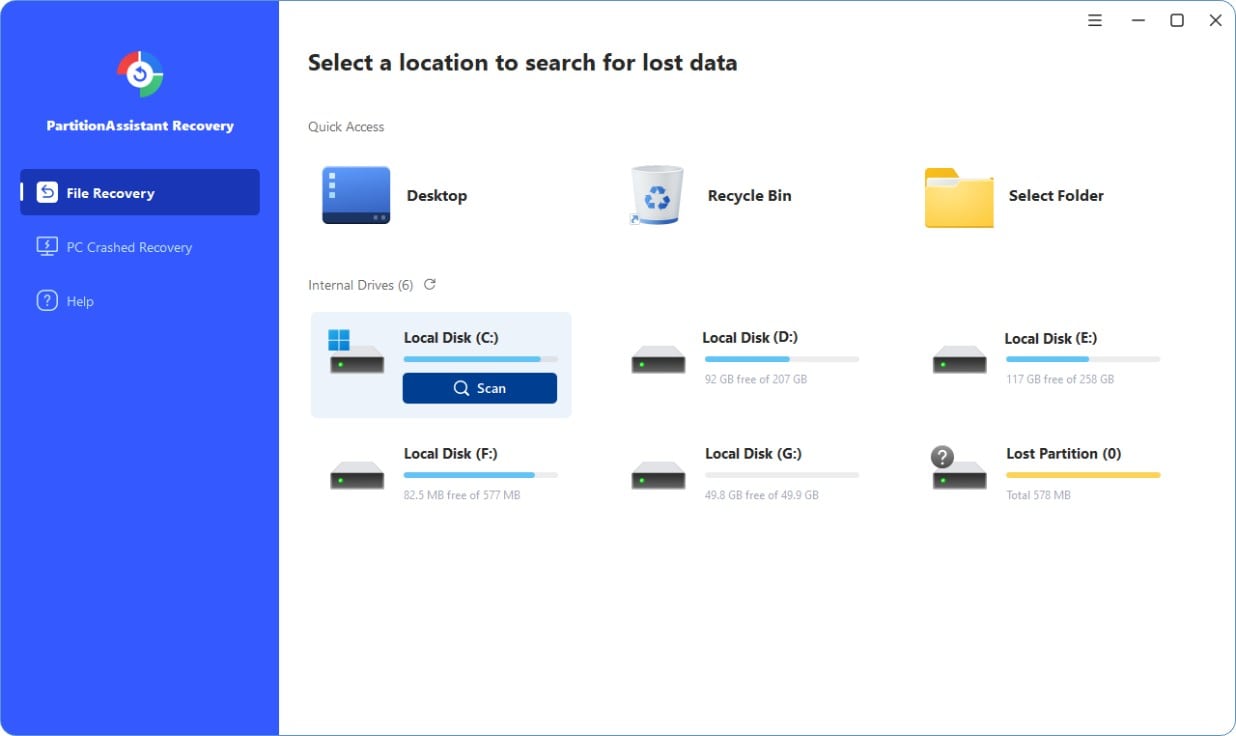
Select a location to start data recovery:
Locate the exact partition or disk
where
your data lost and click Scan.
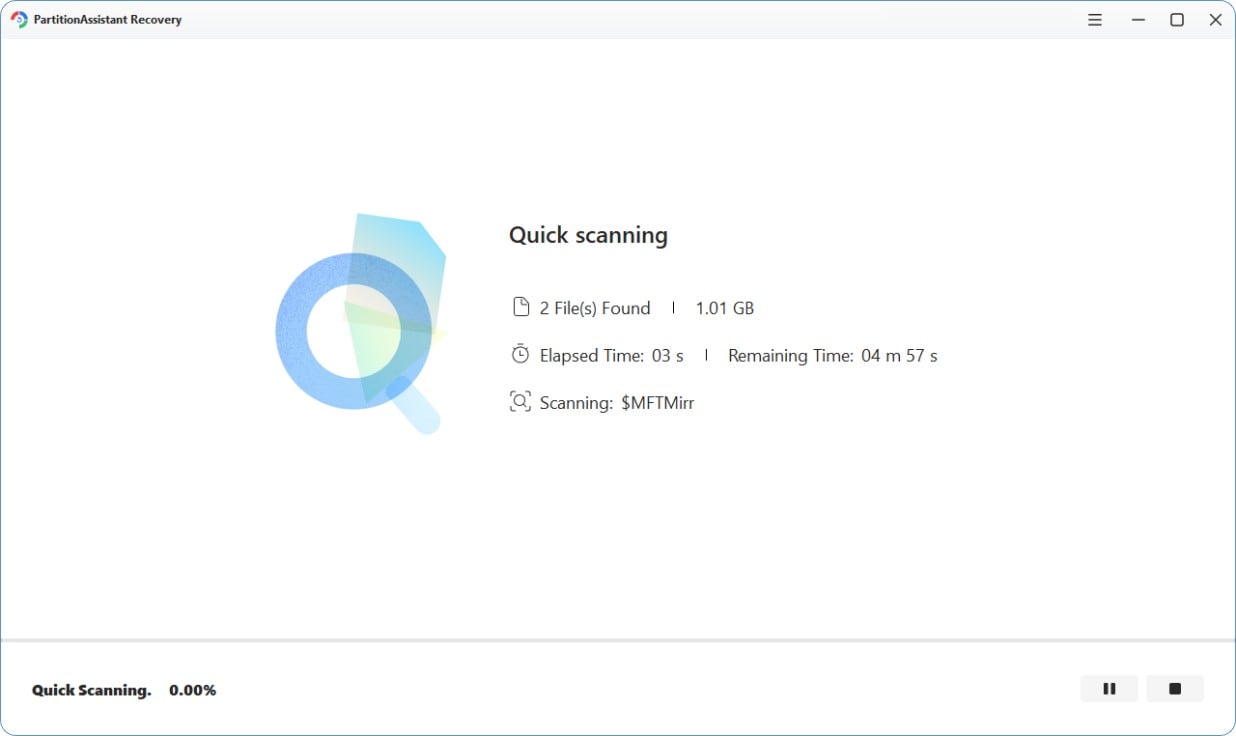
Scan and Search:
It will execute the “Quickly Scan” first for finding your deleted
data fast, and then execute the “Deep Scan” for searching other lost data.
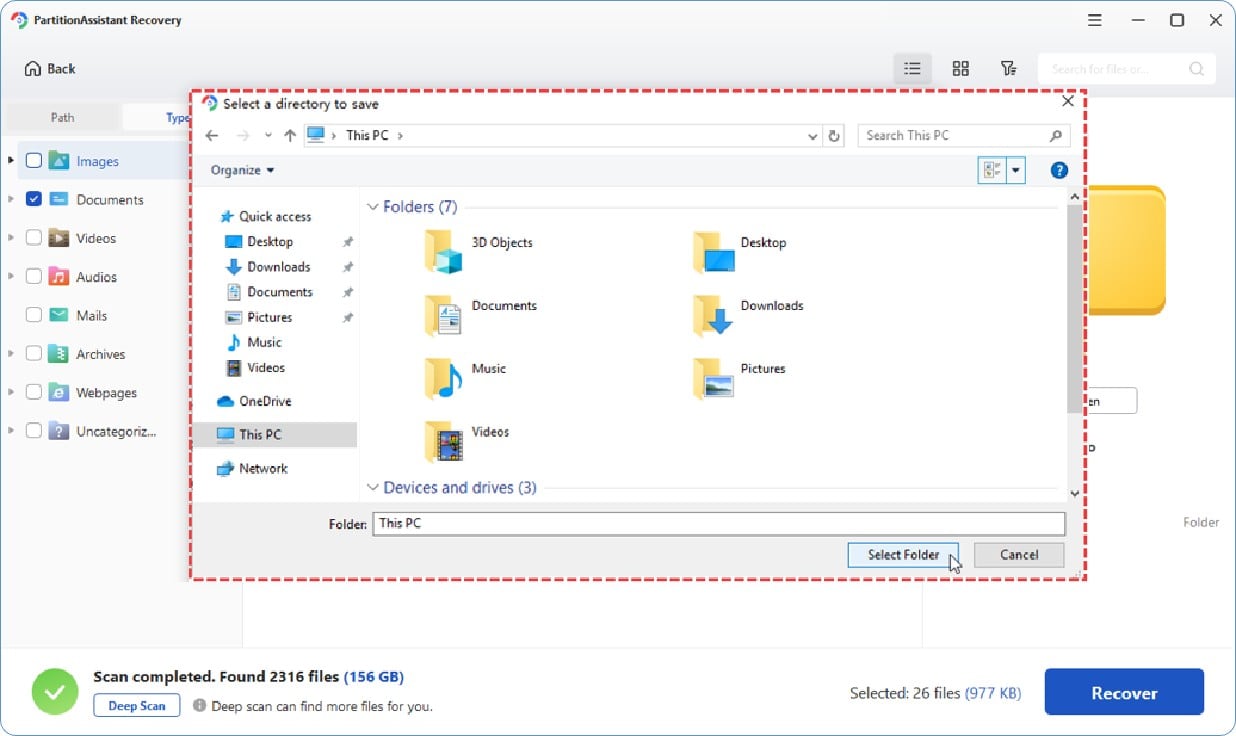
Restore your lost files:
After scanning, you need to select a new storage location on your computer
to save these recovered files.

Using the shortest time to scan and recover lost data in an effective way.

Often succeeds in situations where other recovery tools fail. Deliver a higher chance of successfully recovering data.

With 16 years development experience, this data recovery software is safe and trustworthy.

Our customers can get help and find answers to questions as soon as they come up.

PartitionAssistant Recovery saved my important work documents after a system crash. The recovery process was quick and easy. Highly recommend!
I accidentally deleted my vacation photos from my SD card, and PartitionAssistant Recovery brought them all back! The preview feature was incredibly helpful.
I emptied my Recycle Bin. Later, I realized that I lost my important files. I basically gave up on recovering my files. Fortunately, I found PartitionAssistant Recovery, which help me get my data back!

PartitionAssistant Recovery is a great data recovery software. With advanced algorithms and scanning technology, PartitionAssistant Recovery is highly recommended to retrieve data in kinds of data loss scenarios.

If you are looking for a software to help you recover files or folders on Windows PCs, you should try PartitionAssistant Recovery, a simple yet powerful data recovery tool that is capable of restoring more than 1000 types of files.

PartitionAssistant Recovery is a fantastic data recovery software that can recover your deleted files on Windows, including documents, audios, videos, email files, and more easily. It is worth to try.
No, there is not a 100% success rate of data recovery with data recovery software. The success rate of data recovery depends on various factors, including the extent of data corruption, the type of storage device, how quickly the recovery is attempted after data loss, and whether new data has overwritten the lost data.
Yes. PartitionAssistant Recovery is a fast and secure Windows data recovery tool. It is stable, and it has a good reputation among our users. It is worth to trust.
Yes, the software recovers deleted data from desktop, laptop, USB drive, SD card and more in any data loss situation.
Yes, you can recover deleted email files with PartitionAssistant Recovery software. It can help you recover many email file types including EMLX, MBOX, GWI, EML, PST, and more.
Yes, only if you paid for this data recovery software. Partition Assistant for Recovery supports scanning and previewing files before paying for recovery.
 PartitionAssistant Recovery
Download this Windows data recovery software now to recover your lost or deleted data immediately.
Free DownloadTrusted by 80M+ Users Worldwide